Download FyshOS
Grab a live ISO and try the Tyde desktop straight from a USB stick — no installation required. Builds are produced automatically from the latest source, and Ferry will download and write one for you.
64-bit PC
Intel or AMD x86_64 — the right choice for most desktops and laptops.
Download ISOFyshOS-2026-09-01_19.16-amd64.hybrid.isoARM 64-bit
AArch64 machines such as the Raspberry Pi 4 and other ARM boards.
Download ISOFyshOS-2026-09-01_19.02-arm64.hybrid.iso32-bit PC
Older x86 hardware that cannot run a 64-bit system.
Download ISOFyshOS-2026-09-01_19.16-i386.hybrid.isoThese are rolling test builds — each one is the latest snapshot of FyshOS for that architecture. You can browse a history of our ISO downloads on the GitHub releases page.
Make a USB Stick with Ferry
Our own USB creator for Linux and macOS — it can even fetch the image for you
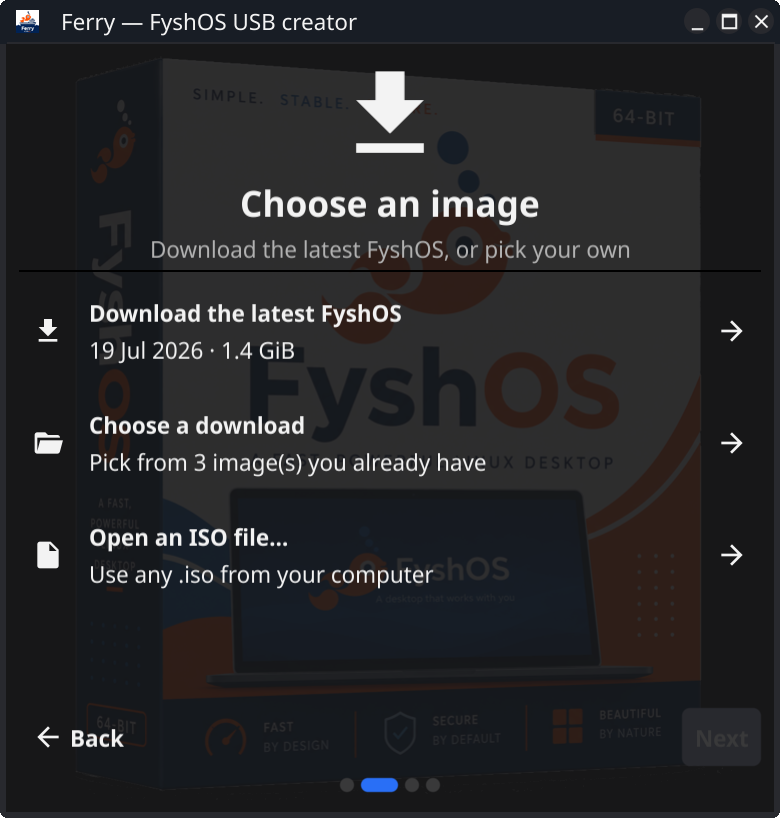
Ferry is a small Fyne application that walks you through four steps — architecture, image, device, write — and hands you a bootable stick at the end. It is a Go program, so with Go installed two commands put it in your applications menu.
go install fyne.io/tools/cmd/fyne@latest
fyne install github.com/fyshos/ferry@latest- Downloads the latest build for you — matched to the architecture you pick, and cached so a second stick costs no bandwidth. Already have an ISO? Ferry will write that instead.
- Only shows removable drives — your system disk never appears in the list, and the last step spells out the model, path and size before anything is overwritten.
- Verifies the result — the stick is read back and checksummed against the image, so a bad write is reported rather than discovered at boot.
- Uses the space left over — on Linux it can turn the remainder of the stick into an exFAT
Datapartition that Linux, macOS and Windows can all read.
Getting Started
From download to desktop in three steps
Write the image to a USB stick
Run Ferry, choose the latest build and a drive of 2 GB or larger, and let it write and verify. If you would rather not install anything, dd or balenaEtcher work too — and the images are hybrid, so they can also be burned to a DVD.
Boot from the drive
Plug the stick into the computer, restart it and choose the USB drive from the boot menu. You may need to disable Secure Boot in your firmware settings first.
Try it, then install
FyshOS runs live from the USB stick so you can explore the Tyde desktop before committing. When you are happy, run the installer from the desktop to put it on your disk.